A beauty professional’s tax records need annual reports, not only bank deposits. This guide explains where to find documents, how to identify your own receipts and what expense records to collect.
Routes checked November 16, 2026. Select the correct year; a form for an unfinished year may not exist yet. Menu labels remain in English to help you find them.
Start with your work arrangement
This guide covers nail, hair, lash, brow, skincare, makeup and massage professionals. First describe your arrangement: employee, independent booth or suite renter, or salon owner. Give the legal name, any LLC and EIN, and the owner of each payment-processing account.
A W-2, chair-rental agreement or contractor label does not replace a review of the actual relationship. Control, financial arrangements and the parties’ relationship matter. California also has state rules. If an S corporation or partnership earns the income, do not automatically put it on your individual Schedule C.
| Arrangement | Records to provide |
|---|---|
| Employee | W-2, tip and reimbursement records, agreement. |
| Independent professional | Receipts, expenses, booth rent, processor reports and assets. |
| Salon or entity owner | Entity records, payroll, professional payments and processor ownership. |
Reconcile services, product sales and tips
Collect every payment channel: cards, cash, Zelle, checks and other apps. A 1099-K reports particular processed payments, not net profit. A sale may appear in the salon report, processor report and 1099. These are records to reconcile, not three separate sources of income.
Identify services, retail products, refunds, chargebacks, processing fees and sales tax collected. Separate gift cards, service packages, advances and refundable deposits for a review of timing and treatment. Bank deposits alone do not explain these categories.
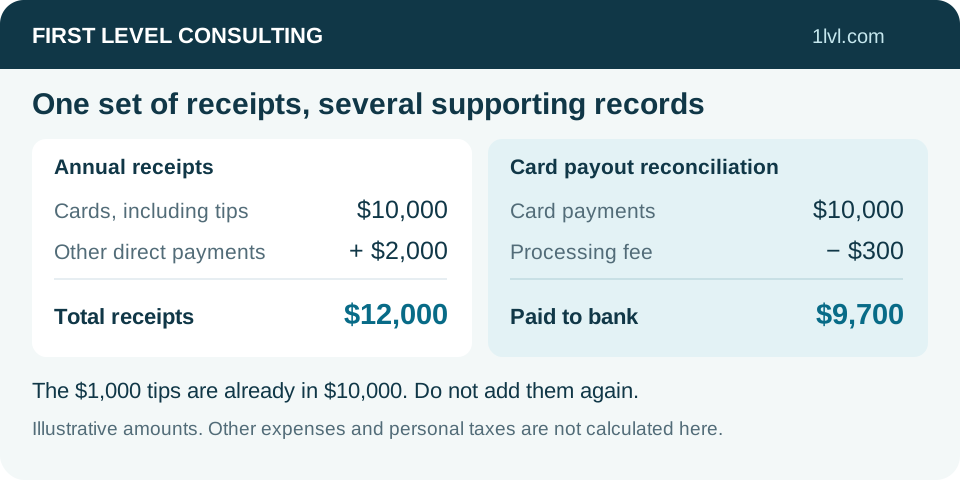
Illustration: $10,000 of card payments already includes $1,000 in tips. A processor deducts $300 and deposits $9,700. Another $2,000 comes directly from clients and appears nowhere else. Before other expenses, the records show $12,000 receipts and $300 fees. Do not add the $1,000 tips again.
Square: tax form and annual reports
In Square Dashboard, locate Tax Forms and download the issued 1099-K for the correct year. For supporting reports, open Reports, choose the report, full year and relevant locations, then Export. Retain available sales, payment, fee, refund and tip reports.
Check the named taxpayer. One salon may pay several professionals, while one merchant account may collect all receipts. Use detailed reports and payment records to explain the allocation rather than arbitrarily reducing the form total.
Vagaro: 1099-K and Sales Summary
On a computer, select your profile at the top right → Merchant Accounts → 1099. Verify your identity, select the correct merchant account and download the form. In Vagaro Pro use More → Credit Card Processing → 1099. Check every processor account used during the year.
On a phone, use More → Reports → Sales Summary. Set the full year, relevant professional and Tip filter. The three-dot menu offers Export PDF or Export Excel. On a computer begin with Reports → Sales Summary. Check the date filter: transaction dates and completed appointment dates can produce different totals.
Booksy: Stripe, Cash flow and Tips report
Booksy directs eligible users to Stripe for 1099-K forms. Check the official invitation and tax year. Reports → Cash flow helps reconcile payments processed through Booksy. Cash, Zelle and another card terminal may fall outside that processed-payment total.
In Booksy Biz open Stats and reports and locate the Tips report. It is available on the web and in the app and downloads as Excel (.xlsx). This supporting record does not replace a 1099-K. Keep it with the overall report so tips are neither omitted nor counted twice.
GlossGenius: documents through Stripe Express
Stripe’s official GlossGenius instructions use Stripe Express for tax forms. Sign in through a verified invitation or the official Stripe Express link. With e-delivery, an email announces availability; otherwise a paper form may be mailed.
Download the issued form and retain available GlossGenius business reports for sales, fees and tips. If the email, phone, account owner or tax information changed, contact support. Do not create an unrelated second profile to obtain a form.
Fresha: reports and an available 1099-K
The documented tax-form route is Workspace settings → Billing → 1099-K → year → Download. On desktop export reports through Reports → selected report → Customize if needed → Options → PDF, CSV or XLSX. If export is missing, check your reporting permissions.
Retain available sales, payment, fee, refund and tip records for the same period. Thresholds or deadlines in older help articles may concern another year. Use IRS guidance for tax rules and these routes to find your documents.
StyleSeat: check tax-form delivery
StyleSeat documents electronic delivery in the app: Menu → Payments & Policies → Tax Settings. Review Your Tax Information and use Opt Into Electronic Delivery if you choose electronic delivery. Eligible StyleSeat Payments users receive tax-form communications from Stripe.
Keep available payment reports and the issued annual form. Add records of payments collected outside StyleSeat. We do not assume an unverified annual-export menu: request the needed report from support if it is unavailable in your account.
Tips: keep separate records without duplicating income
Keep voluntary card tips, cash tips, mandatory service charges and amounts passed to other professionals separately. The IRS list includes several beauty occupations, but the occupation alone does not establish all conditions for a qualified-tips deduction.
Tips remain part of income records. A possible federal deduction is reviewed separately and does not exempt all receipts or self-employment tax. Employees should retain tip reports provided to their employer. Do not manually remove tips from gross because of the phrase No Tax on Tips.
Which expense records to collect
Collect booth or suite rent, processing and booking fees, advertising, insurance, license renewals, professional services and treatment supplies. Separate personal grooming, personal cosmetics and family purchases. For education, give the course purpose and syllabus: entering a new trade differs from maintaining existing skills.
Separate resale products from supplies consumed in services. Provide beginning and ending inventory, purchases, supplier returns and personal withdrawals. The same products must not appear both in supplies and cost of goods sold.
List chairs, machines, sterilizers, furniture and major improvements in the asset register: description, cost, purchase and in-service dates, business use, financing and sale. Include the previous depreciation schedule. The timing and method of any deduction require a tax-year and facts review.
Travel, home workspace and assistants
For mobile appointments and supply runs, keep dates, routes, business purposes and miles. Also record total annual mileage, commuting and personal trips. Do not automatically add gasoline to standard mileage; the method and previous vehicle treatment need review.
For a home workspace provide total and business area, period of use and home costs. Serving clients or handling appointments at home does not automatically create a home-office deduction. Separate assistant payments from personal transfers and provide agreements, W-9s, payroll and issued forms as applicable.
Finish the annual handoff
Reconcile the year, account ownership and all payment channels. Identify missing months and uncertain entries. Save another organizer for a separate independent business; several beauty services within one business do not necessarily require separate files.
New clients need the latest complete filed return and, when available, the last two years: federal and state returns, schedules, assets and carryovers. Use the secure channel assigned by our team, TaxesToGo or your personal Egnyte link, including for a scope and fee estimate. Do not attach records to your initial email or SMS. Tell us if you have never filed or cannot obtain previous records.
What to prepare for a discussion
- Work arrangement, legal name and ownership of processing accounts.
- All issued W-2s / 1099s and annual reports for each payment channel.
- Separate tips, refunds, fees, sales tax, gift cards and deposits.
- Rent, supplies, resale inventory, expenses and assistant payments.
- Assets, purchase/sale records, prior depreciation, mileage and home-workspace facts.
- Latest complete return; two years when available.
Questions and answers
Does renting a chair automatically mean Schedule C?
Review actual independence, tax structure and state rules. A booth agreement is useful but does not settle every issue.
Do hair and brow services need separate workbooks?
Not necessarily when they are services of one business. Separate independent businesses and entities require their own review.
My 1099-K is below my total income. What should I do?
Collect every payment channel, including cash and outside apps. The form may cover only one processor’s payments.
Does a Tips report replace a 1099?
No. It supports tip records and the gross reconciliation; issued tax forms are also needed.
Official sources
- IRS: independent contractor or employee www.irs.gov
- California Board of Barbering and Cosmetology: worker rights and classification barbercosmo.ca.gov
- IRS: understand and reconcile Form 1099-K www.irs.gov
- Square: manage and download Form 1099-K squareup.com
- Square: export reports squareup.com
- Vagaro: download Form 1099-K support.vagaro.com
- Vagaro: Sales Summary and Excel/PDF exports support.vagaro.com
- Booksy: tax forms and Stripe support.booksy.com
- Booksy: download the Tips report support.booksy.com
- Stripe: tax forms for GlossGenius professionals support.stripe.com
- Fresha: locate and download Form 1099-K www.fresha.com
- Fresha: export reports as PDF, CSV or XLSX www.fresha.com
- StyleSeat: tax documents and electronic delivery www.styleseat.com
- IRS: tip recordkeeping and reporting www.irs.gov
- IRS: occupations that customarily and regularly receive tips www.irs.gov
- IRS: Schedule C instructions www.irs.gov
- IRS Publication 334: business income, inventory and expenses www.irs.gov
- IRS Publication 946: depreciation and business assets www.irs.gov
- IRS Topic 510: business use of a car www.irs.gov
- IRS Publication 463: vehicle, travel and supporting records www.irs.gov
- IRS Publication 587: business use of a home www.irs.gov
- IRS: business recordkeeping www.irs.gov