A single 1099 or the amount deposited into your bank account usually is not enough to prepare a return. Collect every platform used during the year, available annual summaries, fees, tips and expense records, plus a mileage log for each vehicle.
Choose a platform below. These routes were checked November 15, 2026; app interfaces can change. Documents for 2026 arrive after that year ends. Until then, save current earnings records and keep tax years separate.
Start with the complete document set
Create a folder for each tax year, then one for each platform. Save PDFs of every issued 1099, the annual Summary or available earnings history, and tips and fee details. A filename such as 2026_Uber_Tax_Summary.pdf makes handoff easier; it is our suggestion, not a platform requirement.
Uber and Lyft may issue a 1099-K, a 1099-NEC, both, or neither, depending on the circumstances. No form does not mean no reportable earnings. Download the Summary and earnings history even without a 1099.
| Record | What it helps verify |
|---|---|
| 1099-K / 1099-NEC | Amounts reported by the platform to the IRS, including any withholding. |
| Tax Summary / Annual Summary / earnings | Gross earnings, fees, bonuses, tips and payouts. |
| Mileage log and vehicle details | Actual travel, business purpose and vehicle business use. |
| Receipts and statements | Expenses, personal purchases and fees already counted elsewhere. |
Gross, fees and net payout: avoid counting the same dollars twice
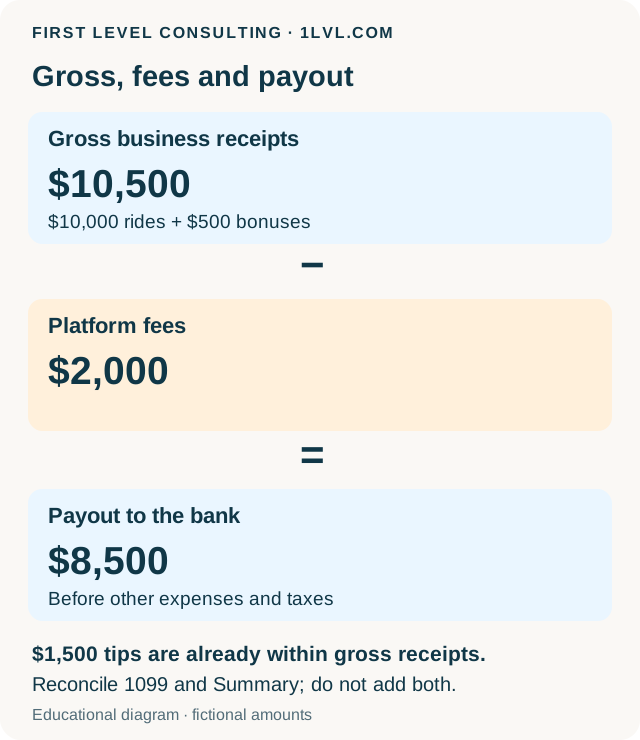
Gross is earnings before relevant deductions; net payout is what remains after them. Uber/Lyft summaries can include platform fees within gross, so bank deposits can be lower. Review fees separately rather than reducing gross and then deducting those fees again.
A 1099, annual Summary and weekly statement may describe the same earnings. Reconcile them instead of adding their totals together. Tips and bonuses already included in total gross are subsets, not extra income to add again. List cash tips received outside the app separately and identify whether annual gross already includes them. Show refunds and adjustments separately with support.
Uber / Uber Eats: Tax Summary and every issued 1099
The Annual Tax Summary helps reconcile gross payment, expenses and fees, net payout, and mileage recorded by Uber. Save it even if no 1099 is issued. The current Uber page describes 2026 documents becoming available by January 31, 2027.
In the app, open Account → Tax Info → Tax Forms
Sign in to the driver account used to earn the money and select the correct tax year.
Or use drivers.uber.com → Tax Information
In the web driver account, find the year and select Download. This is the driver portal, rather than your passenger-trip history.
Save the Summary and all available forms
Download the Annual Tax Summary and every issued 1099-K / 1099-NEC. Include corrected forms with an explanation if applicable.
Check tips, fees and mileage
Attach available tip details and your mileage log. A platform total is useful for reconciliation, but does not establish every deductible mile.
Lyft: Annual Summary, 1099s and weekly PDFs when needed
Drivers with earnings can receive an Annual Summary even without a 1099. It helps reconcile gross payments, non-ride earnings, fees, online miles and passenger tips. Save every page, not just the first screen.
Open Driver Dashboard → Tax Center
Sign in to the Lyft driver dashboard and select the correct year.
Under Documents, select Download
Save the Annual Summary and all available 1099-K / 1099-NEC forms. Reconcile passenger tips with gross rather than adding them twice.
Download weekly summaries if more detail is needed
From the Dashboard menu, open Driving history, select a week and choose Download weekly summary. These PDFs can explain differences.
Include your own mileage log
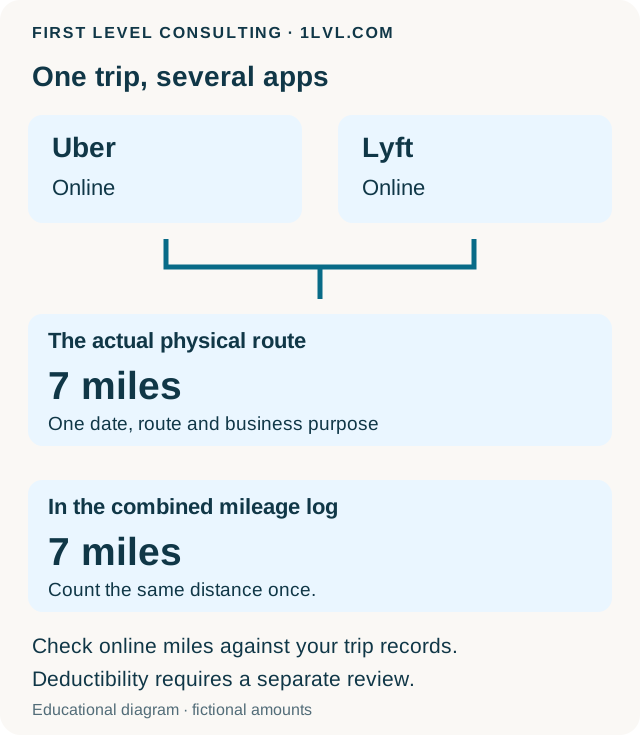
Summary online miles can overlap with another app. Reconcile actual vehicle travel with one complete log.
DoorDash: download the 1099-NEC in the Dasher app
Use the Dasher app for current documents; Stripe Express instructions can refer to older years. The usual 1099-NEC reporting threshold was $600 for 2025 and is $2,000 for 2026, subject to exceptions. Earnings below the form threshold still need to be reported correctly.
Open Earnings → View payout details → Reporting
Select Tax documents and check the tax year.
Open the form PDF
Use the Share icon to save the file. Include all pages and any state information.
Use Tax Statement Preferences if needed
For 2026, DoorDash describes a way to request a form below the threshold: Reporting → Tax Statement Preferences → On.
Save earnings, tip details and any mileage estimate separately
DoorDash generally provides its mileage estimate by the end of February. It covers on-delivery miles and does not replace a full log or a business-purpose review of other trips.
Amazon Flex: use the right account and Flex documents
Amazon Tax Central is Amazon’s official tax-document portal. Sign in with the account connected to your Flex work and check the available tax statements for the year. Save documents specifically for Flex, along with earnings/payment history and any available tip breakdown.
Use official Flex Support for the exact route in your version of the Flex app. Seller Central and KDP instructions concern other Amazon programs; request documents specifically for Flex.
Open official Amazon Tax Central
Check the account and year. If you have several Amazon accounts, do not assume every account contains your Flex records.
Save available forms and payment records
If a form is missing, keep the earnings history you do have. A missing document does not establish zero income.
Ask Flex Support to confirm the document location
Use support in your Flex app or the official Flex FAQ. Specify the tax year and request the correct download route or a copy.
Instacart: use Instacart for tax years 2023 onward
Stripe’s official support explains that tax forms for 2023 and later years moved to the Instacart Shopper app and Instacart Help Center. Stripe Express concerns older 2021–2022 documents.
Open the Shopper app and its tax-document help for the year, or contact the Shopper Help Center for the exact route after signing in. Save all issued 1099s, available earnings and tip history, and your own mileage log. Include annual and mileage records if available in your account.
Grubhub: Tax form information or the Driver Portal
Grubhub’s current help describes electronic form delivery through the app and Driver Portal. Choose the year and save the full 1099-NEC, plus available earnings and tip history.
In the app, open Account → Personal info → Tax form information
Check electronic-delivery settings and the requested year.
Use Get my tax form
Follow the request for a copy. Grubhub says forms are available beginning in February and requested copies are sent within 24 hours.
Or sign in at driverportal.grubhub.com
The Driver Portal is another official route. Contact support about missing or incorrect documents while retaining your earnings records.
Tips: keep the right records for 2025 and 2026
The federal qualified tips deduction for 2025–2028 has conditions. Tips still have to be reported. For gig workers they generally belong in business gross receipts and remain subject to self-employment tax.
Schedule 1-A is where the deduction is claimed. Eligibility includes the occupation, voluntary nature of the payment, substantiation and information-reporting requirements. Save app breakdowns, annual summaries, forms, and daily or weekly cash-tip records. The IRS term cash tips also includes voluntary card and app tips, not just currency. Mandatory service charges do not become qualified tips simply because of a label.
The annual federal cap is $25,000 per return, with a self-employed business-income limit and a phaseout above $150,000 MAGI ($300,000 for joint filers). Other requirements include an employment-valid SSN and joint filing for married taxpayers. California does not conform to this federal deduction; state treatment must be reviewed separately.
| Earnings year | Where to find tip details |
|---|---|
| 2025 | 2025 forms do not have the new separate qualified-tip fields. Retain additional platform records and support meeting the transition-year requirements. |
| 2026 · 1099-NEC | Box 1a: total nonemployee compensation. Box 1b: cash tips already included in 1a. Box 1c: Treasury Tipped Occupation Code. |
| 2026 · 1099-K | Box 1c: cash tips. Box 1d: occupation code. Reconcile tips with gross rather than adding them a second time. |
Mileage: count each physical mile once
Keep records by vehicle: date, route, business purpose, distance and necessary odometer readings. Track annual total, business, commuting and personal miles. A trip from home is not automatically business travel; classification depends on the facts.
When several apps are online together, their mileage can overlap. Reconcile them to one vehicle log. For 2026, preserve separate January 1–June 30 and July 1–December 31 totals: the federal business standard mileage rates are 72.5¢ and 76¢, respectively. Eligibility to use that method still needs review.
Standard mileage and actual vehicle expenses are evaluated with prior-year history and applicable rules. Do not automatically deduct mileage plus gas, repairs, insurance or depreciation for the same vehicle. Keep business parking and tolls separately.
MileIQ or a simple spreadsheet: review and export the records
MileIQ is one option alongside other software or a manual log. Review trip classifications regularly: automatic detection does not determine tax treatment.
MileIQ’s documented web export route is Reports → choose filters → Create this report → enter a name → Create and send report. Save the PDF/CSV for the correct year and vehicle. Attach a useful export instead of retyping every trip into our organizer.
Finish the package and send it securely
Reconcile every platform, earnings and expenses. Use separate files for separate business activities; Uber and Lyft do not automatically require separate Schedule Cs. A distinct trucking business is easier to prepare with the truck organizer.
New clients need their latest complete filed return and, when available, the last two years: federal, all states and schedules, asset/depreciation schedules and carryover information. Tell us if you are filing for the first time or cannot obtain earlier records.
Upload the workbook and documents through the secure channel assigned by our team, TaxesToGo or your personal Egnyte link, including for a scope and fee estimate. Your initial email or SMS can say the records are ready, without tax or personal attachments.
What to prepare for a discussion
- Every platform used to earn money during the year, including closed accounts.
- All issued 1099s and complete Annual/Tax Summaries, plus earnings and tip breakdowns.
- Mileage records for each vehicle, separated into the two 2026 periods.
- Expense support, vehicle purchase/sale details and prior depreciation records.
- Estimated tax payments and the latest complete return; two years if available.
Questions and answers
I did not receive a 1099. Do I still send records?
Yes. Provide earnings history, available annual summaries, expenses and mileage. A form-reporting threshold does not remove the obligation to report earnings correctly.
Can I provide only my bank deposits?
Uber/Lyft deposits can already be reduced by fees. Gross and Summary details are needed to reconstruct earnings and avoid deducting fees twice.
Must Uber and Lyft issue both forms?
No. The forms depend on the year, amounts and other circumstances. Download every issued form and the Summary even if no 1099 is issued.
Should I add separately displayed tips to gross?
First check whether they are included in gross. Included tips are detail within income, not another amount to add.
Does the workbook replace receipts and mileage records?
No. It organizes information for return preparation. Retain platform reports, supporting travel records and receipts.
Official sources
- Uber — U.S. tax information www.uber.com
- Uber Help — access tax forms and Tax Summary help.uber.com
- Lyft — tax information for U.S. drivers help.lyft.com
- Lyft — earnings and weekly summaries help.lyft.com
- DoorDash — common Dasher tax questions help.doordash.com
- Stripe — Instacart tax forms moved to the Shopper app for 2023 onward support.stripe.com
- Instacart Shopper — Help Center sign-in shoppers.instacart.com
- Amazon Tax Central — secure tax-document portal taxcentral.amazon.com
- Amazon Flex — official driver FAQ and support flex.amazon.com
- Grubhub — how to receive a 1099 driver-support.grubhub.com
- Grubhub — Driver Portal driver-support.grubhub.com
- IRS — instructions for Forms 1099-MISC and 1099-NEC www.irs.gov
- IRS Publication 505 — 2026 information reporting and tips www.irs.gov
- IRS — tip recordkeeping and the qualified tips deduction www.irs.gov
- IRS — records for new deductions on 2025 returns www.irs.gov
- California FTB — summary of federal income-tax changes www.ftb.ca.gov
- IRS Announcement 2026-11 — midyear mileage-rate change www.irs.gov
- IRS Publication 463 — travel, meals, car expenses and records www.irs.gov
- MileIQ — create and export a report support.mileiq.com