We need a complete selling year, not just a 1099-K and bank deposits. Create a folder for each store with tax forms, annual exports, monthly reports and purchase documents. Keep original CSV files unchanged and use a separate working copy for explanations.
These routes were checked November 16, 2026. Available sections depend on the store country, account type and user permissions. Select one tax year; final documents for an unfinished year may become available only after year-end.
Start with the selling activity
Identify purchased goods for resale, items you make, digital products and personal belongings separately. Selling an old personal laptop and buying laptops regularly for resale require different starting records. For a personal item, retain its original cost and sale amount; a personal loss does not become a business expense.
List the store owner, business name, EIN if applicable, starting date and every platform. Explain receipts through another person’s account or a form issued to the wrong recipient, and include correction correspondence. Do not alter the PDF yourself.
Amazon Seller Central: save both summary and detail
Confirm that this is your seller account, not Amazon Flex. Amazon documents the following route; include both Standard and Invoiced orders where applicable.
Reports → Payments → Reports Repository
Select the required reporting dates.
Request Transaction and Summary
For Transaction, select All (Unified Reports) where available for your account. Save the generated files.
Include any issued 1099-K
December/January amounts can differ because report dates and conventions differ. Provide both sources for reconciliation.
eBay: transaction report and monthly statements
Orders and payouts answer different questions. Keep the annual transaction report and available monthly financial statements to explain refunds, disputes and payout timing.
Seller Hub → Payments → Reports
Choose Transaction report, set Type, Start and End dates, then Create report. Save the CSV when generated.
Reports → Statements
Select the month and Download. Save the Full statement PDF for detailed review. Also include each issued 1099-K.
Etsy: annual CSV, monthly statements and 1099-K
Export completed activity rather than only active listings. Both orders and Etsy Payments records help explain payouts.
Shop Manager → Settings → Options → Download Data
Under Orders, choose CSV Type and Year. Leave Month unselected for a whole-year file, then Download CSV.
Finances → Monthly statements
When needed, choose View all monthly statements, year and month, then Generate CSV. Save the completed export.
Finances → Legal and tax information
Select Your tax year and Download 1099-K if a form was issued.
Reconcile revenue instead of adding documents
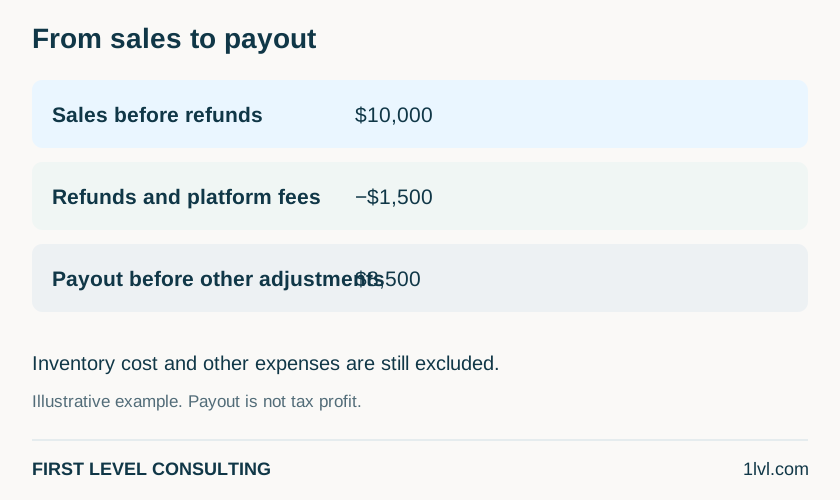
A 1099-K, annual export and bank payouts can describe the same transactions. Do not add them as three new income sources. In your working summary separate sales, refunds, fees, shipping and other adjustments, and retain marketplace-collected taxes separately for review.
If you provide both a prepared profit and loss report and Excel, identify the controlling record. Do not deduct fees already included in the books twice. Explain discrepancies by order number and known cause instead of forcing the report to match bank deposits.
Purchases, inventory and equipment
Prepare opening and closing inventory, purchases, supplier returns, personal withdrawals and related costs. Keep a physical count or warehouse/FBA report, with explanations for damaged or missing goods. Cost of goods sold and the inventory method require a business-specific review.
List printers, computers, shelving and other equipment with purchase and in-service dates, cost, business use and prior depreciation. Include sold or retired assets. Separately gather packaging, postage, advertising, subscriptions, insurance and professional-service records.
Before handing over records
If you are new to First Level, provide the latest complete filed return and, when available, the last two years. Include federal and state returns, all schedules, asset/depreciation schedules and carryovers. Tell us when a return is unavailable instead of guessing.
Use the secure channel assigned by our team, TaxesToGo or your personal Egnyte link, including for a scope and fee estimate. Downloading Excel does not send us your information. Do not attach completed organizers, tax forms or identification details to your initial email or SMS.
What to prepare for a discussion
- All stores, account owners and business structure.
- Every issued 1099 and original annual CSV/PDF export.
- Refunds, fees, payouts and reconciliation explanations.
- Opening/closing inventory, purchases, cost and inventory method.
- Other costs, assets, prior depreciation and complete previous returns.
Questions and answers
No 1099-K was issued. Can I leave out the store?
No. Provide selling records and income information. Form issuance and income reporting are separate questions.
Must I retype every sale into Excel?
No. Attach a useful annual export and enter agreed totals and explanations in the organizer.
Can I immediately deduct every purchase?
Do not decide from the payment total alone. We need goods, inventory and accounting-method records; equipment is reviewed separately.
Official sources
- Amazon Seller Central — transaction and summary reports sellercentral.amazon.com
- eBay — reconcile sales and download reports www.ebay.com
- Etsy — download sold transactions as CSV help.etsy.com
- Etsy — monthly statements and payment reconciliation help.etsy.com
- Etsy — download Form 1099-K help.etsy.com
- IRS — what to do with Form 1099-K www.irs.gov
- IRS Publication 334 — business income, expenses and inventory www.irs.gov
- IRS Publication 946 — depreciation and asset records www.irs.gov