You may find work through Thumbtack, Taskrabbit, Angi, advertising or referrals. For tax preparation, identify who paid for the work, what was withheld and what you paid separately. A job history and a bank statement show different parts of the same business.
This guide helps an independent service business prepare records. W-2 employment, partnerships and corporations need their own accounting package. A trade name, an LLC or the word contractor in an app does not establish tax classification. Routes were checked November 16, 2026; choose the correct year and retain original reports.
Start with the business and payment methods
Enter the work performed, legal name, owner, EIN if applicable, business location and tax year. Identify a business started or closed during the year. For an LLC, provide ownership and any tax election instead of guessing the return type.
List direct customers, property managers, platforms and warranty companies. Identify cash, checks, Zelle, cards and platform deposits separately. Mark transfers between your own accounts and owner contributions so they are not mistaken for sales. Tell us if more than one business uses the same account.
Thumbtack: leads are different from customer payments
Under the usual lead model, Thumbtack helps connect you with a customer, and the customer pays for your work. Lead charges are business spending, not your earnings. A list of customer inquiries is not a list of paid jobs; an inquiry that never becomes a job can still create an advertising charge.
Save the full year of billing charges, credits and refunds. Separately collect invoices and customer payments. Thumbtack terms also allow Marketplace Payments through a processing partner such as Stripe. If you used that feature, include its payment history, withheld charges and any tax forms for that payment stream.
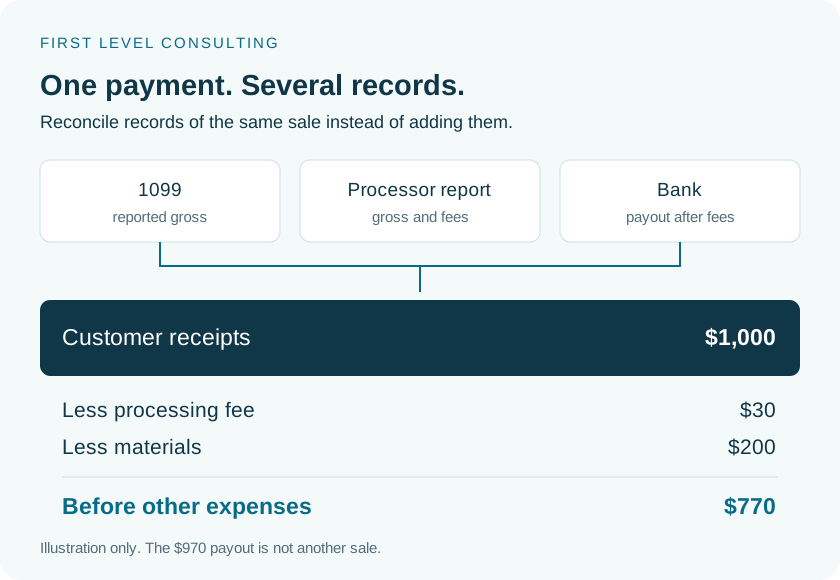
Do not expect one universal 1099 from every website that generated an order. A customer or payment processor may issue the form, and several documents can describe the same payment. Reconcile them rather than adding them together.
Taskrabbit: download annual Transaction History
The website is the simplest way to obtain a full-year report. Taskrabbit documents the following route. Keep the CSV for reconciliation and the PDF for readable supporting records when both are available.
Sign in to your Tasker account on Taskrabbit.com
Open Account, then Transactions.
Select Download Transaction History
Choose the tax year and CSV or PDF. Confirm the report covers your whole working period.
For the app, open My Performance → Monthly Earnings
Use the download icon. App downloads may be monthly, so check that you have every month.
Retain tax forms and explanations of differences
Payment history, refunds, 1099s and deposits reconcile the same earnings. Do not add a 1099 to revenue already captured in your annual total.
Angi, advertising and direct jobs
Identify your Angi product: advertising/leads through Angi for Pros or completed work through Angi Services. An advertising statement documents charges to your business. It does not by itself document what you earned for completed jobs.
For web billing statements, open My business → Billing and payments. Use Print to print or save a PDF. In the app, use Account → Billing and payments → Billing statements. Appropriate account permissions are required.
For Angi Services, also obtain completed-work and payment history, charges, refunds and issued tax forms through the support team for that product. Retain invoices and credits for Yelp, Google Local Services and other advertising. Build your sales total from actual customer and processor payment records.
Gross receipts, withheld fees and preliminary profit
Collect service receipts and separately identify additional payments and tips not already included. Record withheld charges once. Keep customer refunds, chargebacks and adjustments with the reason and supporting document.
For example, a customer pays $1,000, the processor keeps $30, your deposit is $970 and job materials cost $200. In this simple illustration, $1,000 of receipts less $30 and $200 leaves $770 before other expenses. The $970 deposit is not another sale.
An unused estimate is not a deductible expense. For unpaid invoices, advances, retainage and refundable deposits, provide the agreement and payment dates. Treatment depends on what the money represents and the accounting method, so keep these items clearly identified.
Parts, materials and customer reimbursements
Separate parts you purchase, items purchased directly by the customer and goods you resell. Keep supplier invoices, returns, core credits and year-end stock. A refunded part should not remain a full expense in your records.
If a customer reimburses your purchase, show both the customer payment and the receipt. Do not automatically treat every reimbursement as tax-free. A part the customer purchased and paid for directly is not your own business expense.
Use the agreed accounting treatment for materials. Do not enter the same cost under supplies, cost of goods sold and other expenses. For significant stock, include beginning and ending inventory and describe the accounting method already used.
| Situation | Records to provide |
|---|---|
| You buy and install a part | Purchase receipt, job reference and amount charged to the customer. |
| The customer buys the part | Your labor invoice and a note about customer-owned materials. |
| Return or warranty replacement | Supplier credit, return record and replacement paperwork. |
| Unused parts remain on hand | Description, cost and year-end stock list. |
Tools, equipment and depreciation
Prepare a complete asset register: power tools, diagnostic instruments, ladders, compressors, computers, trailers and other equipment. Include the cost, purchase date, date ready for business use, business-use share and any sale or retirement.
For older assets, provide prior depreciation schedules and any section 179 or bonus depreciation. Changing preparers does not restart the deduction of the original purchase price. Current expensing versus depreciation requires the applicable facts and rules.
Place vehicles in the vehicle section. Split financing payments into interest and principal; the entire monthly loan payment is not one ordinary expense. Equipment purchases, rentals and leases also require different records. Attach agreements rather than choosing a deduction based only on the bank description.
Travel, home administration and helpers
Keep vehicle dates, routes, business purpose, miles and odometer readings. Separate personal driving. Visiting job sites does not automatically make all annual mileage business mileage. Do not combine a mileage deduction with a second deduction for the same fuel, repairs and insurance.
For home administration, report space, use and household costs so home-office eligibility can be reviewed. Allocate telephone and internet between business and personal use. Tell us about a separate shop, storage unit or rented business premises.
For helpers, collect names, agreements, payment totals, payment methods and W-9 information through the secure channel. Calling someone a subcontractor does not settle worker classification or state law. Licensing, permits, insurance and CSLB requirements are separate from income-tax preparation; a platform profile does not authorize otherwise restricted work.
Check the package before sending it
Reconcile each payment channel to your annual records and bank activity. Flag missing months, disputed charges and expenses already withheld by a platform. A zero expense is different from an unknown expense: leave an unknown amount blank and explain what is missing.
New clients should provide the latest complete filed return and, when available, the last two years: federal, states, all schedules, depreciation and carryovers. Tell us if this is the first return or prior records cannot be obtained.
Send the organizer and support through the secure channel assigned by our team, TaxesToGo or your personal Egnyte link, including for a scope and fee estimate. Do not attach EINs, W-9s, tax returns or completed workbooks to your initial email or SMS. Useful accounting reports can replace manual entry of hundreds of individual transactions.
What to prepare for a discussion
- All sources of jobs and all payment channels for the year.
- Issued 1099s, Taskrabbit Transaction History, processor reports and bank records.
- Thumbtack/Angi billing, advertising invoices, credits and refunds.
- Parts, materials, inventory, customer purchases and reimbursements.
- Tools and vehicles, purchase/use/sale dates and prior depreciation.
- Mileage log, home-office facts, phone, insurance, helpers and W-9 records.
- Latest complete filed return; two years if available; an explanation of unknown amounts.
Questions and answers
Thumbtack did not issue a 1099. Can I omit the income?
No. Reconstruct actual customer and processor payments. Receiving a form and receiving income are separate questions.
Do I need a separate workbook for every app?
No. One business can include several platforms and direct clients. Separate businesses and legal entities require a structure review.
Can I immediately deduct every tool?
Treatment depends on cost, use, dates and the applicable rules. Supply the register and receipts; do not enter a purchase as both an expense and depreciation.
Can I leave out reimbursed parts?
Show the customer payment and purchase together with an explanation. Automatically excluding every reimbursement can distort the records.
Does this organizer turn W-2 wages into business income?
No. Provide W-2 and reimbursement records for employment. Use a separate business organizer only for your separate business activity.
Official sources
- Taskrabbit — download annual Transaction History support.taskrabbit.com
- Thumbtack — how professionals find jobs and receive customer payments www.thumbtack.com
- Thumbtack — terms, fees and Marketplace Payments www.thumbtack.com
- Angi — download business billing statements intercom.help
- Angi — separate support for advertising and Angi Services www.angi.com
- IRS Publication 334 — business income and expenses www.irs.gov
- IRS — business recordkeeping www.irs.gov
- IRS Publication 583 — starting a business and keeping records www.irs.gov
- IRS Publication 946 — depreciation and asset dispositions www.irs.gov
- IRS Schedule C instructions — expense categories and supporting schedules www.irs.gov
- IRS Publication 463 — vehicle methods and business-use records www.irs.gov
- IRS Publication 587 — business use of your home www.irs.gov
- IRS — independent contractor or employee www.irs.gov
- California CSLB — licensing and journey-level work www.cslb.ca.gov